Підручник Англійська мова 5 клас для спеціалізованих шкіл з поглибленним вивченням англійської мови - Л.В. Калініна - Генеза 2018 рік
Unit Five: School Life
5:4. What do you do to become computer literate?
Word Bank |
Phrase Bank |
Communication Box |
stuff |
computer skills |
It is easier said than |
search e-pal |
computer literate |
done. |
lab e-mail |
brand-new |
If I can do it, you can |
message |
to become addicted |
do it too. |
to set the time limit |
I know what you mean. |
I. Conversation Warm-up
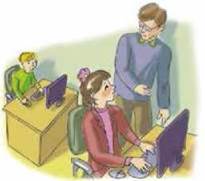
Look at the photos and describe the computer room in action.

Example: The children are practising their computer skills.
II. Pronunciation Warm-up
Listen to/read the interview with a computer user and practise the sound /η/. Say what else you can use the computer for.
INTERVIEW
What can we use our computers for?
For schoolwork and playing,
For searching and sharing,
For emails and chatrooms,
For making new friends.
III. Function Smart
Read and learn to express preferences in computer activities. Look at the pictures and fill in the mini-dialogues.
1. - What about playing …?
- I prefer … to … .
2. - Let’s find this information in the … .
- Fantastic! It is just my choice.
3. - I want … to my e-pals, but I have no idea how to do it.
- It’s just a piece of cake. If I can do it, you can do it, too.
4. - … is so exciting!
- I don’t think so. I like … much better.

Use: a racing game/an adventure game, talking in Skype, to send e-mail messages, Internet.
IV. Word Smart
Study these words and describe:
1. The role of computers in your life:
… computer literate?
… computer skills?
… computer addict?
Example: Everyone is computer literate these days. Me, too.
2. The computer room in your school:
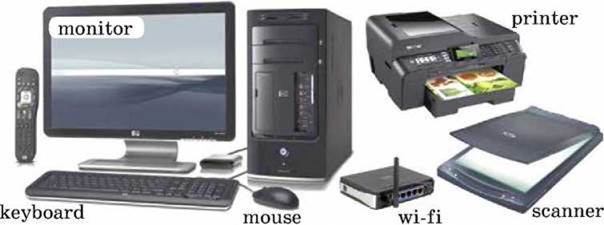
Example: The computer room is well-equipped ….
3. A new computer user:
to have no idea how …
to show how …
to be difficult …

At Home:
Compare your preferences in computer activities with those of your friend’s. Fill in the preference chart.
THE PREFERENCE CHART
Computer activities |
You |
Your friend |
1. doing school work 2. typing messages 3. sending e-mails 4. searching for information 5. playing computer games 6. … |
+ |
Go to Ex. 96-97 of your Workbook
V. Time to Read
1. Read in pairs. Say what computer skills the children have Do you have the same skills?
TALKING ABOUT COMPUTER SKILLS
Steve: Hi, Helen. Where are you going?
Helen: To the computer room. I want to do some information search in the Internet.
Steve: Do you know much about computers?
Helen: Sure. Everyone is computer literate these days. Why do you ask?
Steve: I have some good news: my parents have just bought me a brand new iPad. It is my choice. It works so fast and it is so easy to carry. Here it is.
Helen: Wow! It is so exciting! Now you can use it everywhere for school work, playing games, sending messages and making new friends, right?
Steve: Certainly. At the click of the mouse I can get any information from the Internet in class and out of class.
Helen: But there are all kinds of stuff there. That is why it is so important to be safe, wise and responsible computer users. Besides, it isn’t a very good idea to spend too much time with the computer.
Steve: I know what you mean. The more time you spend with the computer, the more addicted you become.
Helen: As for me, I prefer to set the time limit for myself - just one hour a day.
Steve: It is easier said than done.
Helen: If I can do it, you can do it, too.
stuff
staff
See First Aid Kit: Word meaning 3, p. 239
2. Fill in stuff or staff.
Example: There are all kinds of … in the Internet. → There are all kinds of stuff in the Internet.
1. The … in the computer lab are very helpful.
2. What kind of … do you like to read?
3. The … room is a room for teachers in a school.
4. All the teaching … are women in our school.
5. There is a lot of interesting … in the computer room.
3. Read out the sentences about and say what you can do on the computer.
• the plus side of computers;
• their minuses.
VI. Time to Communicate:
1. Act as Ann and describe your computer room.
computer skills
to do some information search
computer user
to set the time limit
to send messages
2. Act as Steve and say if you are a computer addict.

to spend too much time with the computer
to get information from the Internet
at the click of a mouse
to use sth for school work
3. In pairs, talk about your computer skills as in the pattern.
Pattern:
A: Hi, … , where …?
B: To the computer … I want ….
A: Do you know much about …?
B: Sure. Everyone is … Why do you ask?
A: I have some good news: … .
B: Wow! Now you can … , right?
A: Certainly. At the click of the mouse I can … .
B: But there are … .
A: I know what you mean.
VII. Time to Listen
Listen to Helen talking about her brand-new computer and say what she uses it for.
VIII. Time to Write
Write a paragraph about how the computer can help you to learn English. Begin with:
• I have some good news: …
• It is so …
• Now I can …
• At the click of the mouse …
• But there are …
• That is why …
• Besides, …
• All in all, …
Go to Ex. 98-100 of уour Workbook
Перша публікація: 01/01/2018
Останнє оновлення: 31/12/2023
Редакційна та навчальна адаптація: Даний матеріал зведено на основі першоджерела/оригінального тексту. Команда проєкту здійснила редакційне оглядове опрацювання, виправлення технічних неточностей, структурування розділів та адаптацію змісту до навчального формату.
Що було опрацьовано:
- усунення форматних дефектів (OCR-помилки, розриви структури, дефектні символи);
- редакційне упорядкування змісту;
- уніфікація термінів відповідно до академічних джерел;
- перевірка відповідності фактичних тверджень тексту першоджерела.
Усі згадки про автора, рік видання та походження первинного тексту збережено відповідно до джерела.